DNS What and HowTo –
The Domain Name System (DNS) translates human-readable names like www.example.com into the IP addresses computers use to connect, such as 93.184.215.14 or 2606:2800:21f:cb07:6820:80da:af6b:8b2c. It is often called the phone book of the internet.
DNS is a distributed, hierarchical database. No single server holds every name; instead, responsibility is delegated down a tree of zones, and answers are cached widely so most lookups finish in milliseconds.
Almost every network action starts with DNS: loading a web page, sending email, calling an API, or joining a Windows domain. When DNS fails, services look “down” even when the servers behind them are healthy.
Key facts at a glance:
- Protocol: defined in RFC 1034 and RFC 1035 (1987).
- Transport: UDP port 53 for most queries; TCP port 53 for large responses and zone transfers; port 853 for DNS over TLS; port 443 for DNS over HTTPS.
- Data unit: the resource record (RR), e.g. an A record mapping a name to an IPv4 address.
- Freshness: every record carries a TTL (time to live) in seconds that controls how long it may be cached.
The DNS hierarchy
DNS names are read right to left, from the most general label to the most specific. www.example.com. is really four levels: the root (the invisible trailing dot), the top-level domain com, the second-level domain example, and the host www.
DNS namespace hierarchy · root, TLDs, zones, hosts
Each box only knows its own names plus who is responsible for the level below, which is how DNS scales to hundreds of millions of domains.
- Root servers know only which servers run each TLD. There are 13 named identities (a.root-servers.net to m.root-servers.net), run by 12 organizations and served from well over a thousand anycast sites worldwide.
- TLD servers know which name servers are authoritative for each domain registered under them. TLDs include generic ones (.com, .org, .net), country codes (.uk, .de, .jp) and newer brand or topic TLDs (.app, .dev).
- Authoritative servers for a zone such as example.com hold the actual records: A, MX, TXT and so on.
Labels can be up to 63 characters each, and a full name up to 253 characters. Names are case-insensitive.
How a lookup works
A full lookup takes eight messages, but your device sends only one; the recursive resolver does the walking and caches every step.
DNS resolution flow · 8 messages, 4 servers
- You type www.example.com. The browser and OS check their own caches and the hosts file. On a miss, the stub resolver sends a recursive query to the configured resolver.
- Resolver asks a root server. If it has nothing cached, it starts at one of the root servers, whose addresses ship with it in a root hints file.
- Root replies with a referral listing the name servers for .com, not the final answer.
- Resolver asks a .com TLD server.
- TLD replies with a referral to the authoritative name servers for example.com (e.g. ns1.example.com), plus glue IPs if needed.
- Resolver asks the authoritative server.
- Authoritative server answers with the A record, 203.0.113.10, and its TTL.
- Resolver returns the answer to your device and caches every record it learned along the way, so the next lookup for any .com name skips steps 2 and 3.
In practice most lookups are answered from cache in under 10 ms; a cold lookup through all levels typically takes 50 to 200 ms.
Server roles
Four roles do the work in every lookup; one machine can play more than one.
| Role | What it does | Typical examples |
| Stub resolver | The small client inside the OS. Sends one recursive query and waits for a final answer. | Windows DNS Client, systemd-resolved, glibc resolver |
| Recursive resolver | Chases the answer on the client’s behalf, walking root → TLD → authoritative, and caches results. | ISP resolvers, 1.1.1.1, 8.8.8.8, 9.9.9.9, Unbound, corporate DCs |
| Authoritative server | Holds the zone data and gives the definitive answer for its names (AA flag set). | Route 53, Cloudflare DNS, Azure DNS, BIND, Windows DNS Server |
| Forwarder | A resolver that sends unanswered queries to another resolver instead of recursing itself. | Home routers, branch-office DNS, conditional forwarders in AD |
Recursive vs iterative queries. A recursive query says “give me the final answer”; the stub sends this to its resolver. An iterative query says “give me the best you know”; the resolver sends these to root, TLD and authoritative servers, which reply with either the answer or a referral to the next server down.
Primary and secondary. Authoritative servers come in sets: the primary holds the editable copy of a zone, and secondaries hold read-only copies kept in sync by zone transfer. Registrars require at least two name servers per domain for redundancy.
Record types
Each resource record has five parts: name, TTL, class (almost always IN), type, and data. These are the types you will meet most often.
| Type | Purpose | Example (zone-file syntax) |
| A | Name → IPv4 address | www 3600 IN A 203.0.113.10 |
| AAAA | Name → IPv6 address | www 3600 IN AAAA 2001:db8::10 |
| CNAME | Alias to another name; cannot sit at the zone apex or beside other records | shop 3600 IN CNAME shops.myplatform.net. |
| MX | Mail servers for the domain, lowest preference number tried first | @ 3600 IN MX 10 mail1.example.com. |
| NS | Name servers authoritative for a zone (also used for delegation) | @ 86400 IN NS ns1.example.com. |
| SOA | Start of authority: primary server, admin contact, serial and timers | @ IN SOA ns1.example.com. hostmaster.example.com. (2026111001 7200 3600 1209600 300) |
| TXT | Free text; used for SPF, DKIM, DMARC and domain verification | @ 3600 IN TXT “v=spf1 include:_spf.google.com -all” |
| PTR | Reverse lookup: IP → name, in in-addr.arpa or ip6.arpa | 10.113.0.203.in-addr.arpa. IN PTR www.example.com. |
| SRV | Service location: priority, weight, port, target | _sip._tcp 3600 IN SRV 10 60 5060 sip1.example.com. |
| CAA | Which certificate authorities may issue certs for the domain | @ 3600 IN CAA 0 issue “letsencrypt.org” |
| HTTPS / SVCB | Service binding: HTTP/3 support, ALPN, IP hints, ECH keys | @ 3600 IN HTTPS 1 . alpn=”h3,h2″ |
| DNSKEY, DS, RRSIG, NSEC | DNSSEC keys, delegation signer, signatures and proof of non-existence | (generated by signing tools) |
Apex aliases. A CNAME is not allowed at the bare domain (example.com) because the apex must also hold SOA and NS records. Providers work around this with proprietary ALIAS, ANAME or CNAME-flattening records that resolve the target and return A/AAAA answers.
Trailing dots matter. In zone files a name ending in . is fully qualified; without it, the zone origin is appended, so mail.example.com inside example.com becomes mail.example.com.example.com.
Caching and TTL
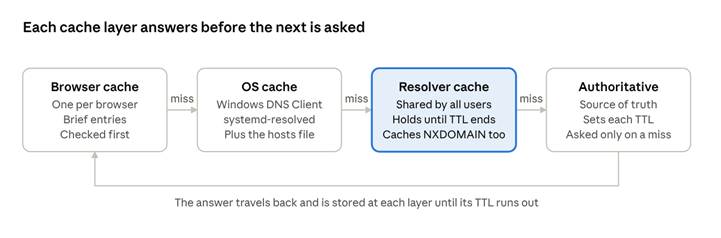
Caching is why DNS is fast, and TTL is why changes are not instant: a record can be served from cache for up to its TTL after you change it.
DNS cache layers · browser, OS, resolver, authoritative
The TTL is a countdown in seconds set by the zone owner. A resolver that caches a record with TTL 3600 serves it for up to an hour without asking again, decrementing the TTL it hands to clients. So-called DNS propagation is simply these caches expiring one by one.
| TTL | Seconds | Good for |
| 5 minutes | 300 | Records about to change; failover and load-balanced endpoints |
| 1 hour | 3600 | Typical default for A, AAAA, CNAME |
| 1 day | 86400 | Stable records: NS, MX, records that rarely change |
Negative caching. A “does not exist” answer (NXDOMAIN) is cached too, for the lower of the SOA minimum field and the SOA record TTL. Creating a record right after someone looked it up can leave them seeing NXDOMAIN until that timer ends.
Trade-off. Short TTLs make changes take effect fast but send more queries to your authoritative servers and add latency on misses. Long TTLs are cheaper and more resilient if your DNS provider has an outage, because resolvers keep serving cached answers.
Zones, delegation and zone transfers
A zone is the slice of the namespace one set of authoritative servers is responsible for. A domain and a zone are not the same: example.com can be one zone, or it can delegate eu.example.com to a separate zone run by another team.
Delegation happens when the parent zone publishes NS records for the child. If the child’s name servers live inside the child itself (e.g. ns1.example.com for example.com), the parent also publishes their A/AAAA records, called glue, so resolvers can reach them without a circular lookup.
The SOA record controls how secondaries stay in sync:
| Field | Meaning | Common value |
| MNAME | Primary name server | ns1.example.com. |
| RNAME | Admin email, with the @ written as a . | hostmaster.example.com. |
| Serial | Version number; must increase on every change | 2026111001 (YYYYMMDDnn) |
| Refresh | How often secondaries check the serial (s) | 3600–86400 |
| Retry | Wait before retrying a failed refresh (s) | 600–7200 |
| Expire | When a secondary stops answering if the primary is unreachable (s) | 1209600 (14 days) |
| Minimum | TTL for negative answers (NXDOMAIN caching), per RFC 2308 | 300–3600 |
Zone transfers copy zone data from primary to secondaries. AXFR sends the whole zone; IXFR sends only the changes since a given serial. NOTIFY messages let the primary push an immediate “check now” instead of waiting for Refresh. Restrict transfers to known secondary IPs (or TSIG keys): an open AXFR hands an attacker your entire host inventory.
Split-horizon DNS serves different answers to internal and external clients for the same name, e.g. a private IP for intranet.example.com inside the office and nothing outside.
DNS security
Classic DNS is unauthenticated and unencrypted, so anyone on the path can read queries and a forged reply can redirect users. These are the main threats and their defences.
| Threat | What happens | Defence |
| Cache poisoning (spoofing) | Attacker races a forged reply into a resolver’s cache, redirecting every user of that resolver | DNSSEC validation; source-port and query-ID randomization; 0x20 case randomization |
| Domain or registrar hijack | Attacker changes NS records at the registrar and takes over the whole domain | Registrar lock, MFA on registrar accounts, monitoring NS and DS changes |
| Dangling records / subdomain takeover | A CNAME points at a deleted cloud resource that an attacker re-registers | Remove records when resources are retired; audit CNAMEs regularly |
| DDoS on DNS servers | Floods knock authoritative or recursive servers offline | Anycast providers, multiple independent DNS providers, rate limiting |
| Amplification / reflection | Open resolvers are abused to flood a victim with large replies | Never run an open resolver; Response Rate Limiting (RRL) |
| Eavesdropping | Queries reveal browsing activity to networks and ISPs | DNS over TLS (DoT) or DNS over HTTPS (DoH) |
| DNS tunnelling | Data is exfiltrated inside query names to an attacker’s domain | Monitor for long, high-entropy query names and unusual volumes |
DNSSEC adds digital signatures, not encryption. Each zone signs its records (RRSIG) with keys published as DNSKEY records; the parent publishes a DS hash of the child’s key, forming a chain of trust up to the root key. A validating resolver that finds a broken chain returns SERVFAIL rather than a possibly forged answer. The most common self-inflicted outage is a stale DS record at the registrar after a key rollover or a provider move.
Encrypted transports protect the hop between client and resolver:
- DoT (RFC 7858) runs DNS over TLS on port 853; easy for network teams to see and allow or block.
- DoH (RFC 8484) runs DNS inside HTTPS on port 443; blends with web traffic and is built into modern browsers.
- DoQ (RFC 9250) runs DNS over QUIC for lower latency.
Enterprises that rely on internal DNS filtering often disable browser DoH via policy, or point it at their own DoH endpoint, so split-horizon names and security filtering keep working.
Tools and commands
dig (Linux, macOS) gives the most detail; nslookup works everywhere; Resolve-DnsName is the PowerShell equivalent on Windows.
| Task | dig | nslookup | PowerShell |
| Basic A lookup | dig example.com | nslookup example.com | Resolve-DnsName example.com |
| Specific record type | dig example.com MX | nslookup -type=MX example.com | Resolve-DnsName example.com -Type MX |
| Ask a specific server | dig @1.1.1.1 example.com | nslookup example.com 1.1.1.1 | Resolve-DnsName example.com -Server 1.1.1.1 |
| Short answer only | dig +short example.com | — | (Resolve-DnsName example.com).IPAddress |
| Reverse lookup | dig -x 203.0.113.10 | nslookup 203.0.113.10 | Resolve-DnsName 203.0.113.10 |
| Trace the full path from root | dig +trace example.com | — | — |
| Ask the authoritative server directly | dig @ns1.example.com example.com +norecurse | nslookup example.com ns1.example.com | Resolve-DnsName example.com -Server ns1.example.com -DnsOnly |
| Check DNSSEC | dig example.com +dnssec | — | Resolve-DnsName example.com -DnssecOk |
Clearing caches after a change:
- Windows: ipconfig /flushdns (view with ipconfig /displaydns)
- macOS: sudo dscacheutil -flushcache; sudo killall -HUP mDNSResponder
- Linux (systemd-resolved): resolvectl flush-caches
- Chrome: chrome://net-internals/#dns → Clear host cache
- Windows DNS Server: Clear-DnsServerCache
Reading dig output. The status: field in the header is the first thing to check: NOERROR means the name exists, NXDOMAIN means it does not, SERVFAIL means the resolver could not get a valid answer (often DNSSEC or unreachable authoritative servers), and REFUSED means the server will not answer you. The flags: line shows aa when the answer came from an authoritative server, and the number beside each record in the ANSWER section is its remaining TTL.
Online checkers such as DNSViz (DNSSEC chains), MXToolbox (mail records) and whatsmydns.net (propagation across global resolvers) are useful when you cannot run commands from the affected network.
Troubleshooting
Work from the client outward: confirm it is DNS, then find which hop gives the wrong answer.
- Confirm it is DNS. If ping 203.0.113.10 works but ping www.example.com fails, name resolution is the problem.
- Check which resolver the client uses. ipconfig /all (Windows), resolvectl status (Linux), scutil –dns (macOS). A VPN or DHCP change often swaps it silently.
- Query that resolver directly, then a public one (1.1.1.1, 8.8.8.8). Different answers point at the local resolver, a cache, or split-horizon.
- Ask the authoritative server with +norecurse. If it is wrong there, the problem is the zone data, not caching.
- Trace delegation with dig +trace. Mismatched NS records between parent and child, or missing glue, show up here.
- Check DNSSEC if you see SERVFAIL: compare dig +cd (checking disabled) with a normal query. If +cd works, the signature chain is broken.
| Symptom | Likely cause | Fix |
| NXDOMAIN for a name that should exist | Typo, record missing, wrong zone, or a cached negative answer | Verify on the authoritative server; wait out the SOA negative TTL or flush caches |
| SERVFAIL | DNSSEC validation failure, authoritative servers unreachable, or lame delegation | dig +cd and DNSViz; check DS record at registrar; confirm NS servers answer |
| Old IP still returned after a change | Cached record within its TTL | Wait for TTL to expire; lower TTL before planned migrations; flush local caches |
| Works on some networks, not others | Different resolvers, stale caches, split-horizon, or a VPN pushing its own DNS | Compare answers from each resolver; check conditional forwarders |
| Slow page loads, fast once loaded | Resolver timeouts; first server in the list down | Test each configured resolver; remove dead ones |
| Email bouncing or landing in spam | Missing or wrong MX, SPF, DKIM or DMARC records | Check with MXToolbox; validate TXT syntax |
| Website works on www but not apex (or reverse) | Only one of the two names has a record | Add the missing A/AAAA or ALIAS record, and a redirect |
| AD domain join or logon fails | Clients pointed at public DNS instead of domain controllers; missing SRV records | Point clients at DC DNS; dcdiag /test:dns; re-register with ipconfig /registerdns |
Before any migration, lower the TTL on records you will change to 300 seconds at least one old-TTL period in advance. After the move, raise it again.
Glossary
| Term | Meaning |
| Anycast | One IP address announced from many locations; queries reach the nearest server. Used by root and large DNS providers. |
| Apex | The bare domain itself (example.com), also called the root or naked domain. |
| Authoritative answer | A reply from a server that hosts the zone, marked with the AA flag. |
| Delegation | Handing a subdomain to other name servers via NS records in the parent zone. |
| FQDN | Fully qualified domain name, ending in the root dot: www.example.com. |
| Glue record | A/AAAA record in the parent zone for a name server inside the delegated zone. |
| Lame delegation | The parent lists an NS server that does not actually serve the zone. |
| Negative caching | Caching an NXDOMAIN answer for the SOA minimum TTL. |
| NXDOMAIN | Response code: the queried name does not exist. |
| Propagation | Informal term for old cached records expiring after a change; really just TTL expiry. |
| Registrar | The company you buy a domain from; it publishes your NS and DS records in the TLD. |
| Registry | The organization that runs a TLD (e.g. Verisign for .com). |
| Resolver | A server that answers recursive queries for clients and caches the results. |
| SERVFAIL | Response code: the server could not produce a valid answer. |
| TLD | Top-level domain: .com, .org, .uk, .io. |
| TTL | Time to live: seconds a record may be cached. |
| Zone | The part of the namespace one set of authoritative servers manages. |