How can we help?
Welcome to our Support Portal. Search for answers using the search box below.,
Check battery usage
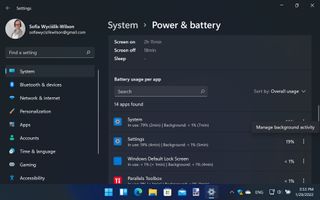
If you’re on a laptop, you will probably want to maximize the life of your battery. When you’re away from a power source, you can check which apps are eating up the most battery by opening Settings and heading to System > Power & battery.
Click View detailed info next to the handy graph of battery usage and you will see a list of battery-hungry apps. You can close down any that are unnecessary or manage their background activity via the three-dot menu next